
Projections
Read and investigate daily, weekly, and monthly forecasts.
Open Projections for the Cashflow overview. It combines recorded cash, remaining planned amounts, and confirmed unpaid documents. All grid values use the workspace reporting currency.
Confirmed invoices and bills appear automatically without a plan. Expand Expected collections → Unpaid invoices or Expected payments → Unpaid bills to inspect them. Other categories contain planned amounts. Detail rows identify their source as Invoice, Bill, or Plan; documents link to View document, while eligible plan amounts offer Reschedule. Draft, voided, fully paid, and fully represented document balances add no standalone forecast amount.
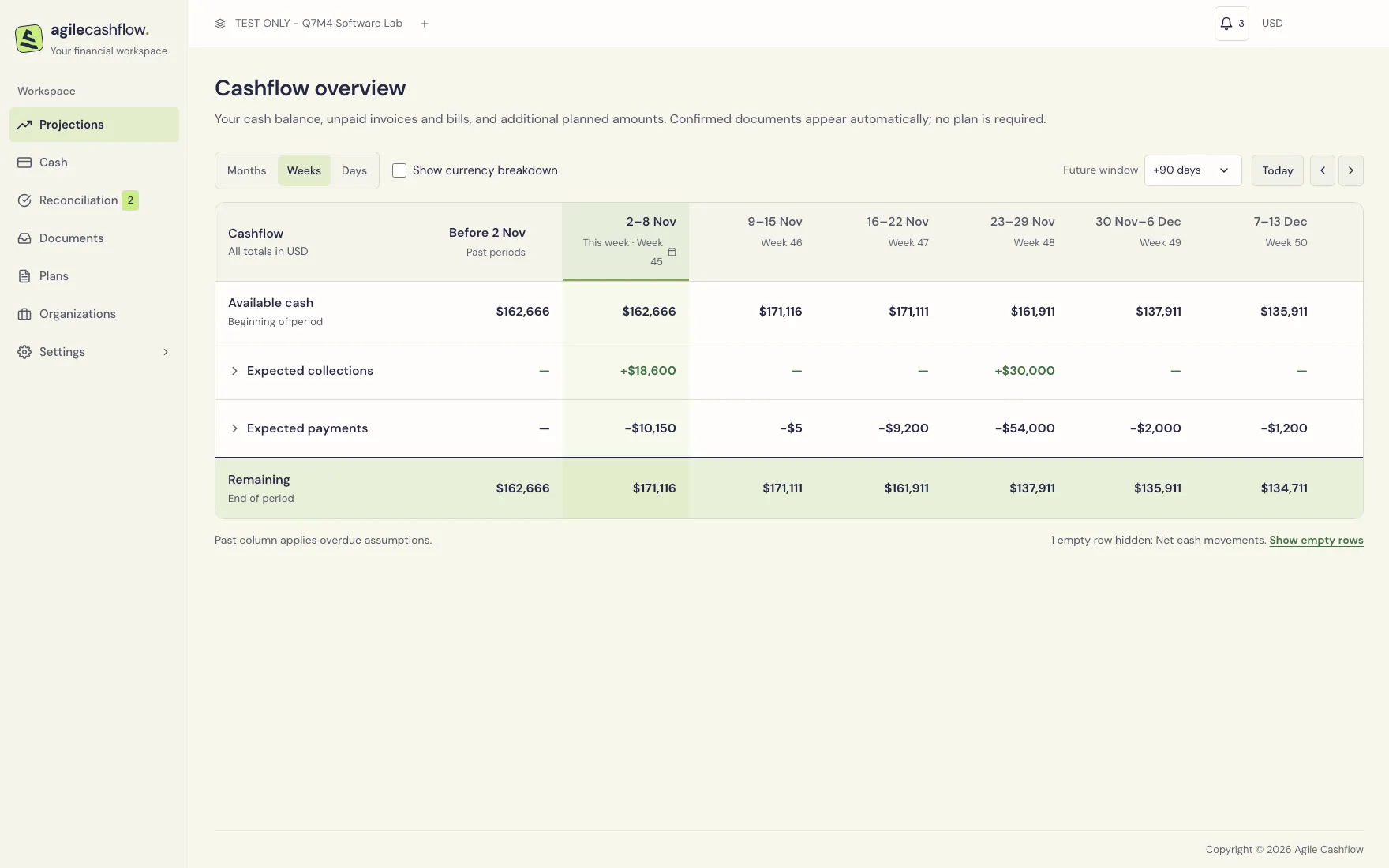
Select the time window
- Choose Days, Weeks, or Months.
- Use Prev period and Next period arrows to move the starting window.
- Select the first period heading to open its date/period picker and jump to another period.
- Choose Today to return to the current period.
- If you need a different initial horizon, set Settings → Defaults → Forecast periods. Defaults apply to future workspace sessions; the current view keeps its selection.
A weekly view begins at the beginning of its displayed week. Its first Available cash is not necessarily today’s account balance: recorded transactions later in that week appear in Net cash movements.
Read each row
| Row | Meaning |
|---|---|
| Available cash — Beginning of period | Reporting cash at the period start, including prior-period projected changes |
| Net cash movements | Recorded receipts minus recorded payments during the period; internal transfers are excluded from operating cash movements |
| Balance adjustments, when present | Opening balances and saved currency valuation adjustments inside the period |
| Expected payments | Remaining expected outflows, including unrepresented unpaid bills |
| Expected collections | Remaining expected inflows, including unrepresented unpaid invoices |
| Remaining — End of period | Beginning cash + net movements + adjustments + collections − payments |
The next period starts with the previous period’s Remaining. A dash indicates no displayed amount/activity for that cell; an explicit $0 can be a calculated zero after matching or settlement.
Worked example from the refreshed local instance
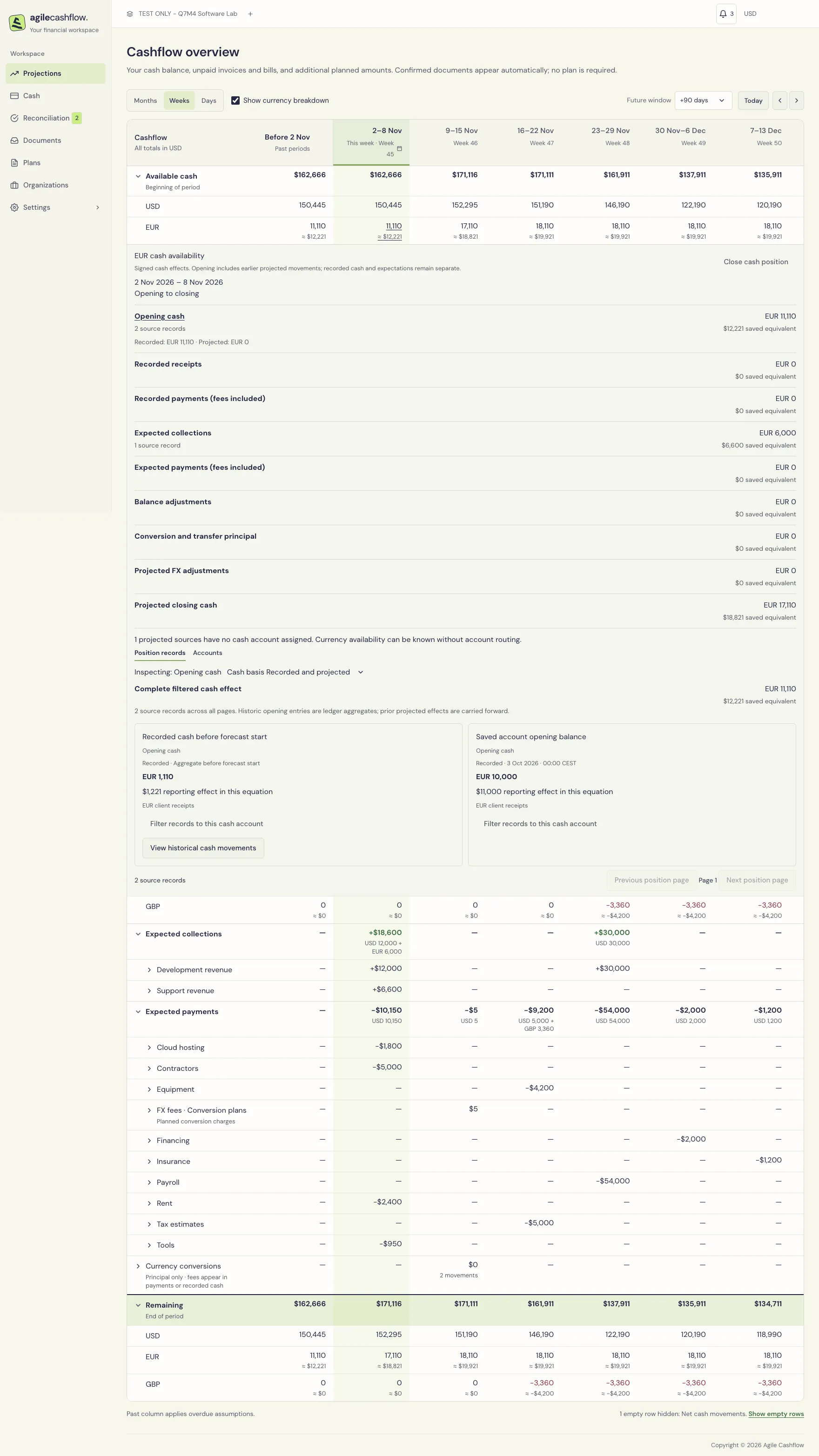
On 2 November 2026, recorded cash is $162,666: Operating bank $120,445, Reserve bank $30,000, and EUR client receipts EUR 11,110 at its saved $12,221 value. GBP clearing is zero.
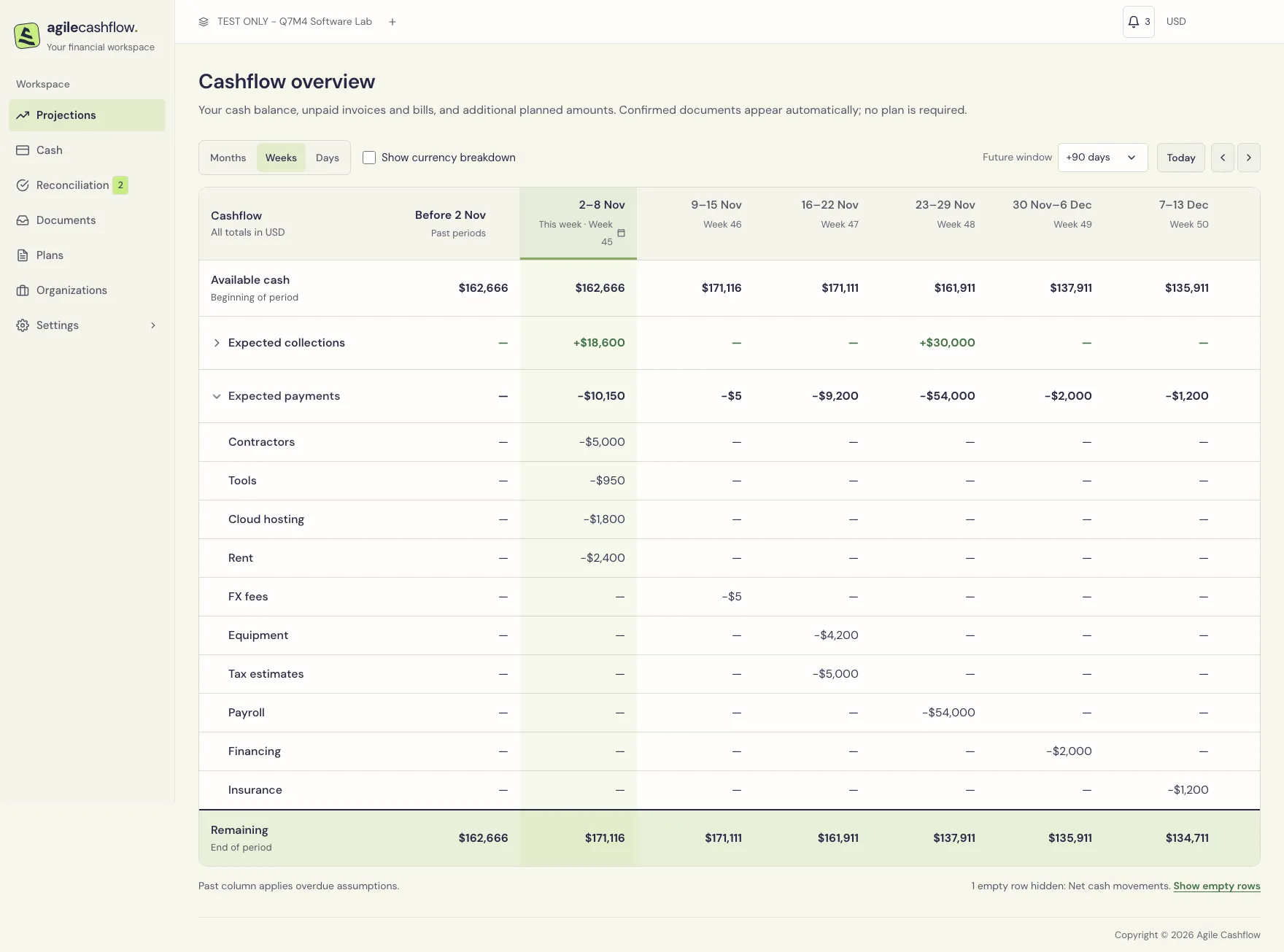
For 2–8 November, collections are $18,600: $12,000 unpaid on the matched retainer and the matched EUR 6,000 support invoice valued at $6,600. Expected payments are $10,150: $5,000 remaining contractor costs, $1,800 hosting, $950 tools, and $2,400 rent. Closing cash is 162,666 + 18,600 − 10,150 = $171,116.
The exchange scenario leaves $1,100 to send, EUR 1,000 to receive, and a $5 expected fee in the following week. Principal moves between currencies; only the fee reduces total reporting cash at these sample rates. The original $2,200/EUR 2,000 plan is retained as historical context.
Dates are anchored to the first local setup. Your actual and projected balances change when you edit the sample; the values above are a dated verification example.
Past and future columns
Past periods summarizes outstanding amounts before the visible window. Its balance applies overdue assumptions; it is not a second bank balance. Future periods summarizes the range after the final visible period. Use Future window (+7, +30, +90, or +365 days) to choose that range. The future column starts after the visible horizon, not after today. Do not add these summary columns to the period totals a second time.
Empty rows may be hidden. Use Show empty rows in the footer to inspect them. With Show currency breakdown, the forecast additionally exposes currency positions, conversions, FX adjustments, and saved-equivalent details. See Multi-currency cash and exchanges.
Expand and investigate
- Expand Net cash movements to see its receipt/payment breakdown, including allocated and unallocated cash groupings.
- Choose an available amount cell to open its detailed records. Inspect dates, organization, amount, and links rather than treating the total as a standalone entry.
- Expand Expected payments or Expected collections to see categories.
- Select a category’s non-empty period cell to view the underlying planned amounts/documents.
- Follow a plan/document link for corrections. Eligible unpaid plan details offer Reschedule. Standalone document rows do not permit the plan rescheduling action.
- Close/collapse detail panels when finished to return to the overall forecast.
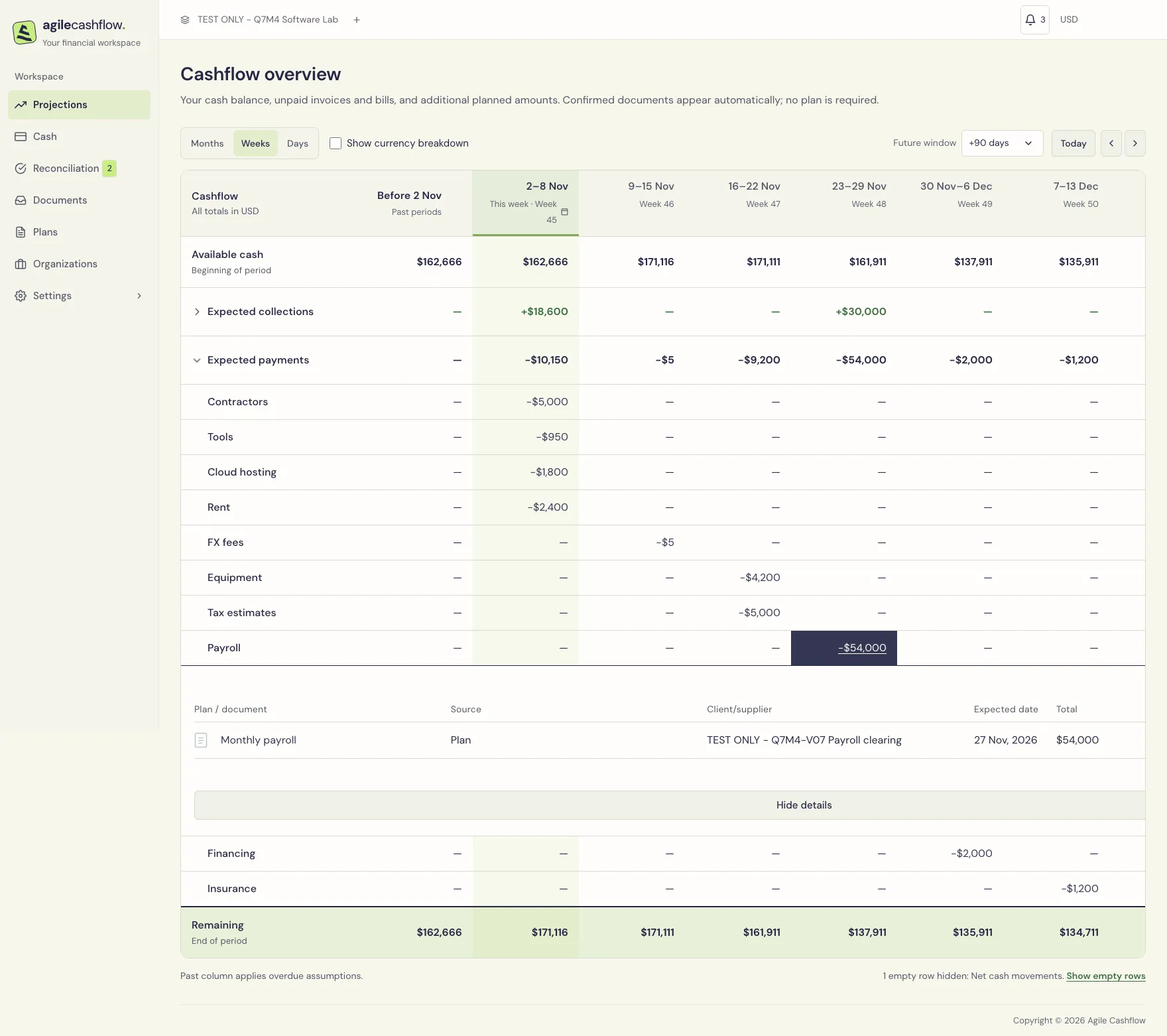
The reporting-view cash-detail panel uses Reconciled and Unreconciled headings for allocated/unallocated cash. These are cash groupings, distinct from document-to-plan matching. In the currency view, a position panel instead explains the currency’s opening, movements and closing cash.
A carried-forward marker identifies an overdue planned amount. Unpaid overdue standalone documents and plans are included in the first applicable forecast period rather than being treated as already available cash. Matched document amounts follow their plan’s schedule; check that date relationship.
Keep the forecast trustworthy
- Confirming an invoice does not record a receipt. Record cash only when it actually moves.
- Allocate payments so paid debt stops appearing as unpaid. Match documents to plans so the same expectation is represented once.
- Do not leave obsolete planned schedules alongside standalone documents for the same work.
- Include payroll, contractors, periodic costs, tax payment estimates, loan repayments, and one-off purchases. Use realistic cash dates rather than only invoice issue dates.
- The laptop draft does not affect projections; its separate equipment plan does. Avoid assuming draft approval has happened because the expense appears through a plan.
- Foreign cash uses saved transaction/opening conversions. A later configuration-rate edit alone does not revalue booked history. Closed foreign positions have zero original and reporting cash.
- Use Balance adjustments to distinguish opening/valuation changes from customer revenue or operating expense.
To save/share a forecast snapshot, use Settings → Import & export → Export data → Projections and choose its start, interval, and period count. Computed forecast totals cannot be imported back as transactions.