
Organizations
Maintain customers and vendors and interpret their balances.
An organization is a customer, vendor, or both. Your own company is the workspace. For example, TEST ONLY - Q7M4 Software Lab is the workspace and TEST ONLY - Q7M4-C01 Retainer customer is a customer organization.
Create an organization
- Open Organizations → New organization.
- Enter Organization name and choose Organization type: Customer, Vendor, or Customer & Vendor.
- Add optional business and contact information: legal name, email, phone, website, Tax / VAT ID, address, city, region, postal code, country, and notes.
- Choose Create organization. Check that the new name appears in the list.
Use Customer for TEST ONLY - Q7M4-C01 Retainer customer, Vendor for TEST ONLY - Q7M4-V01 Contract engineering, and Customer & Vendor when the same legal party both buys and supplies services. A website must include its protocol, such as https://q7m4-c01.invalid.
You can also create an organization from the picker inside a plan, document, or transaction. Choose New organization, complete its form, and save it. Canceling the organization form returns you to the original form with its draft values retained. Saving selects the newly created organization.
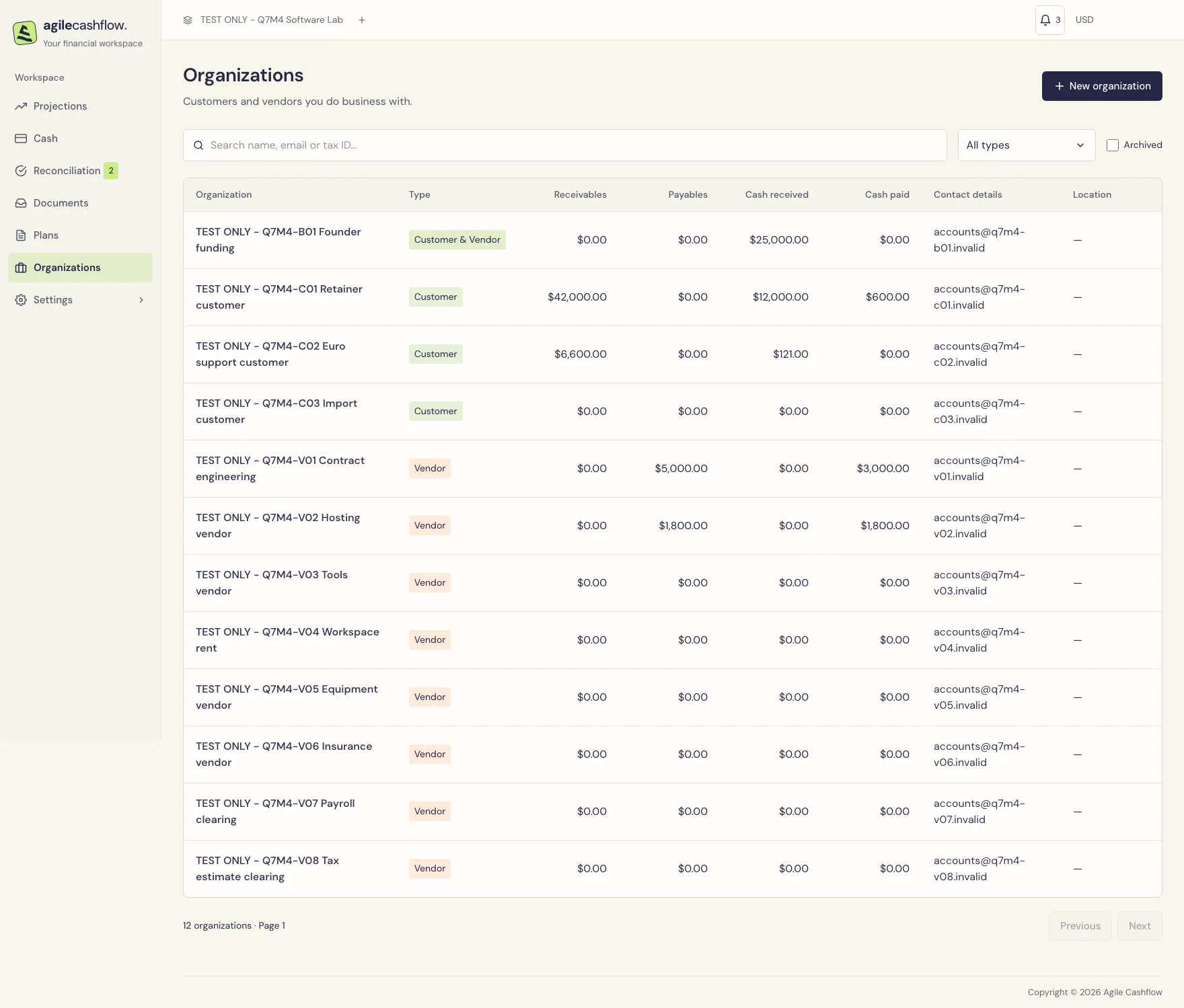
Search and filter
- Enter part of a name, email, or tax ID in Search organizations.
- Use All types to restrict the list to customers, vendors, or organizations with both roles.
- Check Archived to see archived organizations instead of active ones.
- Use Previous and Next for additional pages. Search and filters change the matching record count.
- Clear the search and restore All types when a record seems to be missing.
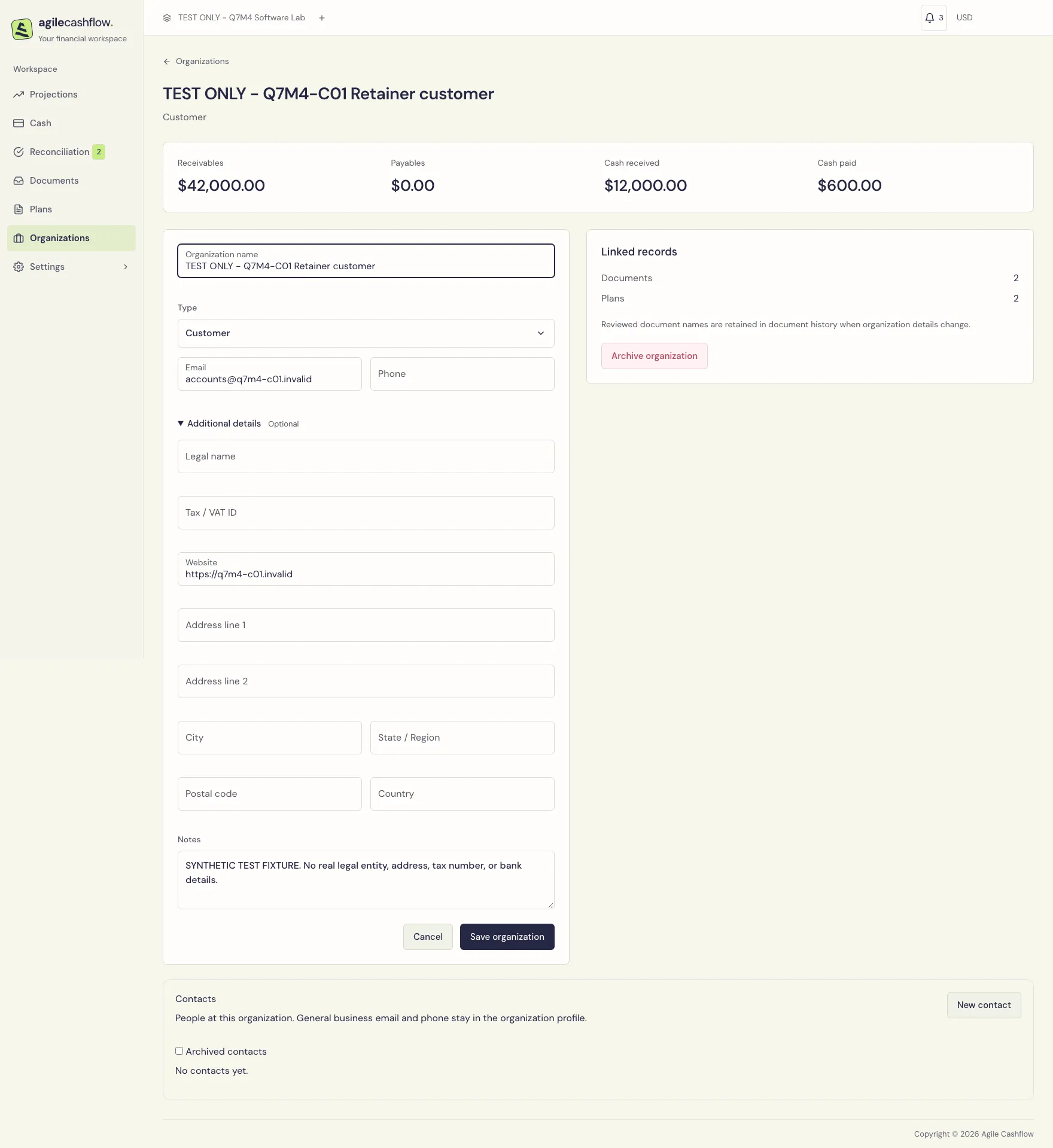
Open an organization’s name to see its editable profile, financial overview, and linked-record counts. Edit the profile and choose Save changes. A saved message confirms success. If another teammate changed the same record, reload its current version before applying your changes again.
Imported organizations show their source system and account in the list and organization picker. The same name may appear independently in several systems. Imported business and person details update from their source; local notes and primary contact selection remain editable. Name-based manual creation does not automatically reuse an imported organization.
Contact people
Open an organization’s profile to manage its Contacts: individual people at that organization. Choose New contact, enter a contact name, and optionally add first/last name, email, phone, job title and notes. The organization’s general email and phone remain separate.
Select Primary contact to replace the current primary person for that organization. People may share names or email addresses. Edit and archive actions apply only to the selected person and require the same permission as editing the organization.
Use Archived contacts to find and restore a person. Restoring a former primary contact does not replace a newer primary. Archiving the organization preserves all of its people; restore the organization before changing them.
Read the financial overview
| Metric | Meaning |
|---|---|
| Receivables | Confirmed customer invoices less recorded payment allocations |
| Payables | Confirmed supplier bills less recorded payment allocations |
| Cash received | All-time recorded receipts associated with this organization, including supported historical payments |
| Cash paid | All-time recorded payments associated with this organization |
Draft documents and plans do not create receivables or payables. The amounts are presented in the workspace reporting currency. They are not limited to the date range of an unrelated screen.
After Q7M4 allocates a $12,000 receipt to its $24,000 C01 retainer invoice, that invoice has $12,000 left to collect. The additional $30,000 C01 milestone makes total C01 receivables $42,000. The $600 goodwill refund is a separate money-out transaction; it does not automatically alter an invoice’s face value or create a credit note.
Cash and debt can differ legitimately: a receipt without an allocation increases cash received while its invoice remains outstanding. Follow the transaction through Allocate payment to settle the invoice.
Archive and restore
- Open the organization’s profile and choose Archive organization.
- Read the confirmation and confirm the archive.
- Existing plans, documents, and history keep their organization link. Archived organizations are unavailable for new selections, and their profiles are not editable.
- To reuse one, return to Organizations, check Archived, open its profile, and choose Restore organization.
Archiving is useful for former clients; it does not settle their balances or erase their records.
For a large customer/vendor directory, use reviewed organization imports. Use Record ID for a rename so it updates the existing organization rather than creating another one.