Home Documentation

The user guide.

Follow one example company from its first cash account to a reviewed cashflow forecast. 12 chapters, real screens, and practical routines—including multi-currency cash, exchanges, and optional services.

Start reading

CHAPTERS

  1. /01Start and navigateUnderstand the workspace, access, terminology, and setup order.
  2. /02OrganizationsMaintain customers and vendors and interpret their balances.
  3. /03Plans and scheduled amountsForecast work, repeat expenses, reschedule amounts, and manage a plan's lifecycle.
  4. /04DocumentsUpload, review, confirm, correct, and void invoices and bills.
  5. /05Cash accounts and transactionsRecord receipts, payments, transfers, and payment allocations.
  6. /06ReconciliationMatch documents to plans without counting the same expectation twice.
  7. /07ProjectionsRead and investigate daily, weekly, and monthly forecasts.
  8. /08Settings, team, and notificationsConfigure the workspace, classification, rates, defaults, and access.
  9. /09Import and exportReview CSV changes, import every supported business dataset, and export records and original files.
  10. /10Finance routines and troubleshootingApply the features to a software company's recurring financial work.
  11. /11Multi-currency cash and exchangesReview original and settlement currencies, inspect liquidity, plan exchanges, and reconcile executions.
  12. /12Optional services and limitsUnderstand capture, billing, API/MCP access, and integration prerequisites.

Follow TEST ONLY - Q7M4 Software Lab, an invented software development company, from its first cash account to a reviewed cashflow forecast. The examples cover project fees, retainers, payroll, contractors, operating costs, equipment, financing, refunds, partial payments, and foreign currency.

This guide describes the platform as of 2 November 2026. To connect accounting, CRM, and other tools, see Integrations. Screenshots show the real application with fictional records in a separate local workspace. Every company name uses a TEST ONLY prefix and the Q7M4 fixture namespace; contact domains end in .invalid. Legal identifiers, postal addresses, and bank details are omitted. Amounts and supplier relationships are illustrative; they are not financial or tax rules.
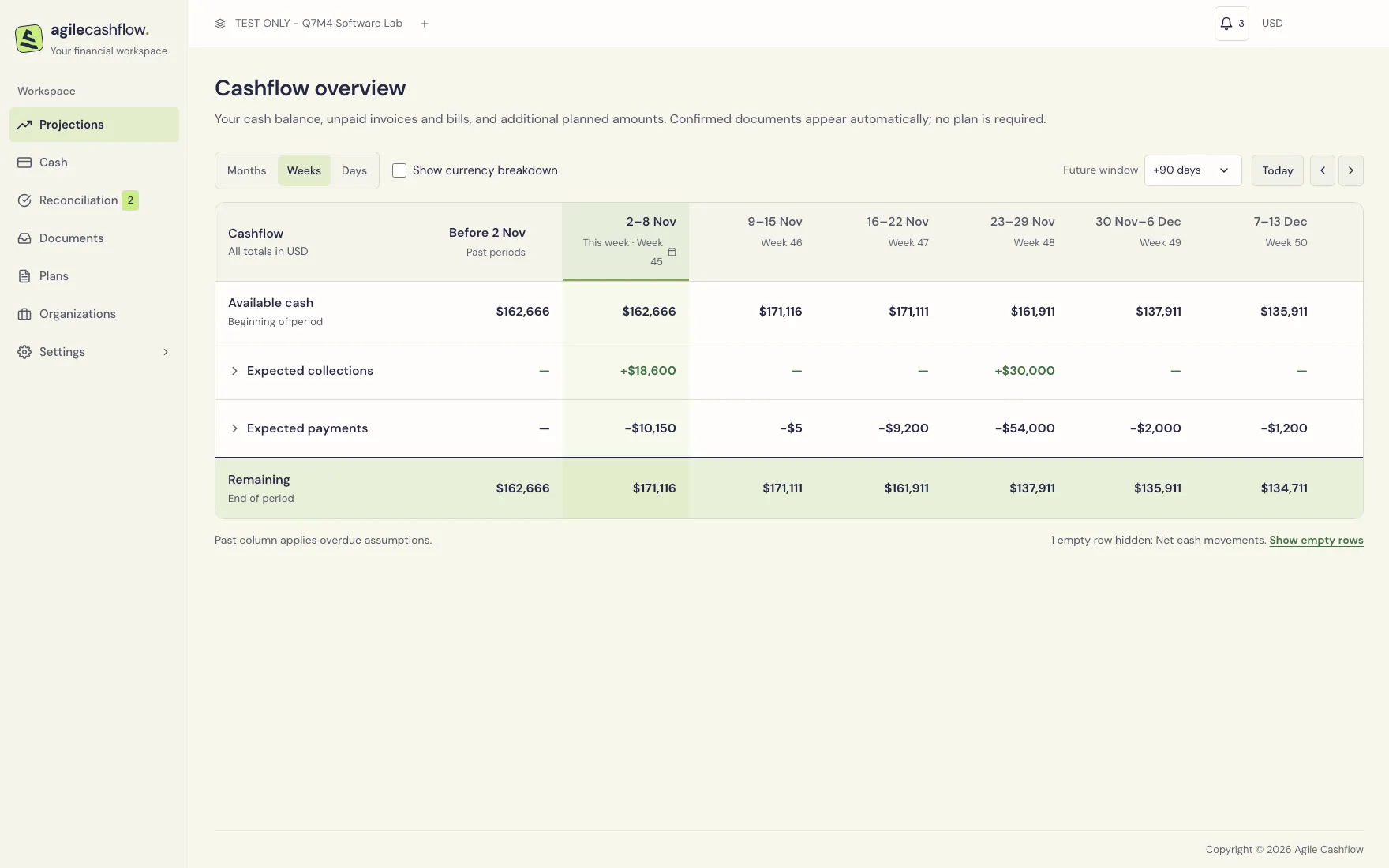
TEST ONLY - Q7M4 Software Lab’s weekly cashflow forecast, with opening cash, recorded movements, planned payments, collections, and closing cash.

The four records to understand first

Record Example Effect
Plan and scheduled amount Expected $54,000 payroll on 27 November Creates an expectation in the forecast.
Confirmed document A $24,000 customer invoice Records an amount owed; its unpaid, unrepresented amount contributes to the forecast.
Cash transaction $12,000 received into Operating bank Changes recorded cash immediately.
Link Allocate the receipt to the invoice; match the invoice to a plan Allocation settles debt. Plan matching connects actual documents with expectations. Neither creates more cash.

Start here: configure workspace settings, create organizations, add cash accounts, and create plans. Then process documents and cash as they arrive.