
Multi-currency cash and exchanges
Review original and settlement currencies, inspect liquidity, plan exchanges, and reconcile executions.
A reporting-currency total does not tell you whether the right currency is available to pay a bill. Review the amount on the original record, the currency expected to move, and the cash available in that currency separately.
Prepare currencies and accounts
- Enable EUR and GBP in Settings → Currencies and add dated rates through Rates. The demo uses fictitious manual quotes: 1 EUR = 1.10 USD and 1 GBP = 1.25 USD.
- Create one cash account per bank/currency position in Cash → Cash accounts. Choose opening balances at the beginning of their opening dates.
- Confirm foreign invoices/bills with their correct currency. Their original amounts and saved reporting values remain visible.
The regular schedule editor enters reporting-currency amounts. To create a native foreign-currency schedule, use the Scheduled amounts CSV import with Currency and Amount, review its conversion, and confirm. Imported foreign schedules have protected financial fields; inspect the saved currency before changing a forecast.
The local C02 support example deliberately matches a USD 6,600 plan to a EUR 6,000 invoice. The invoice supplies the native currency. Matching it fully replaces the planned reporting amount, so expected collections include $6,600 once.
Inspect currency liquidity
- Open Projections and enable Show currency breakdown. The preference is retained per workspace in this browser.
- Expand Available cash or Remaining to inspect currency positions. Read both the currency amount and its saved reporting equivalent.
- Open a currency amount to inspect Currency cash position details. Use the records/accounts views to trace opening cash, booked movements, planned collections/payments, conversions, adjustments, and closing cash.
- Expand Expected collections/payments and open a category amount. Switch between Expected cash and Original amounts. These are two views of the same contributions; do not add them together.
- Follow the source link to inspect or correct the document, plan, exchange, or account. Use Refresh details if the forecast changed while a panel was open.
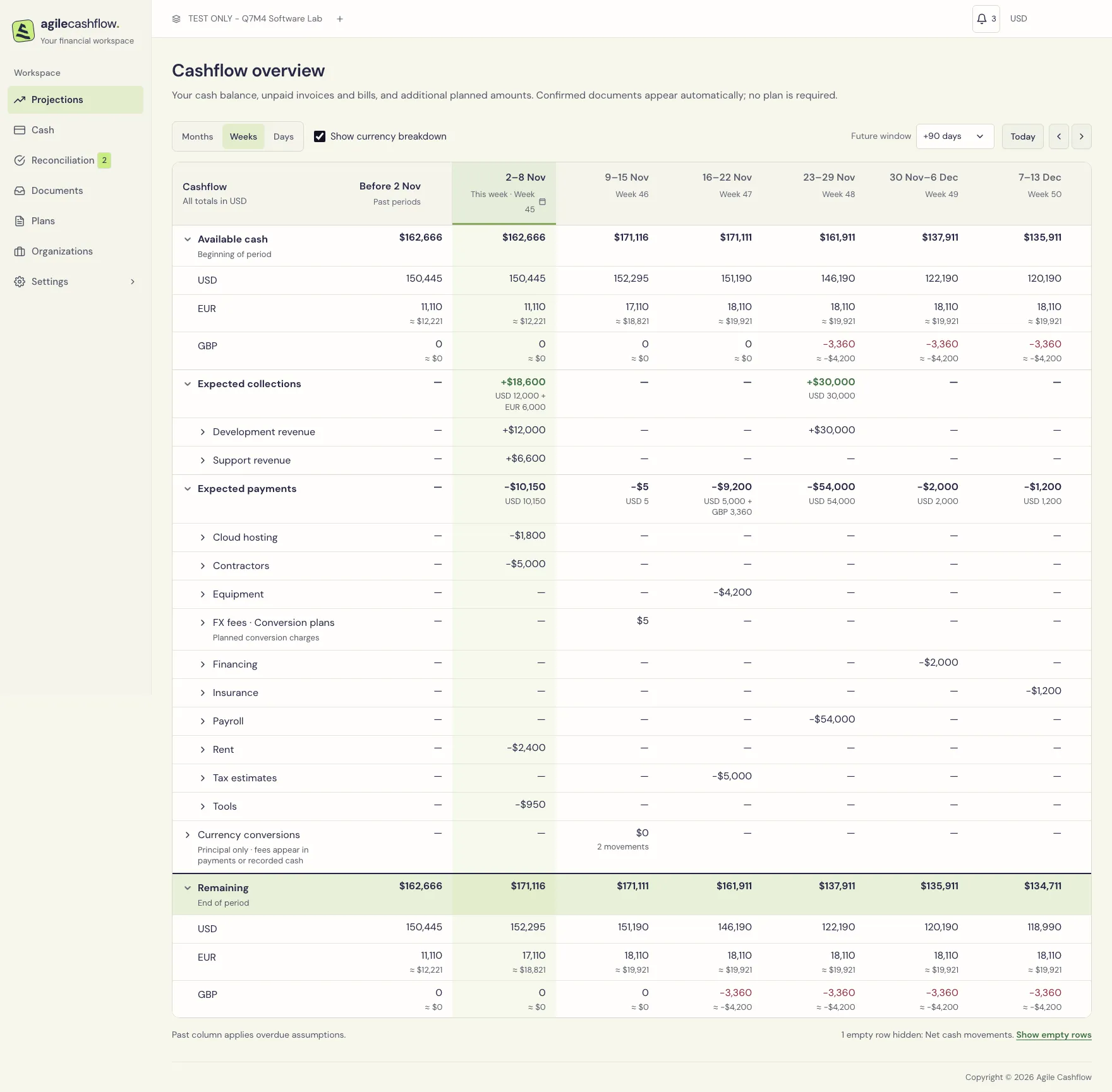
The local GBP clearing account starts at zero. The laptop plan expects GBP 3,360, equivalent to USD 4,200. This shows a GBP funding gap even while total USD-equivalent cash is positive. Review funding in that currency before treating the aggregate balance as spendable.
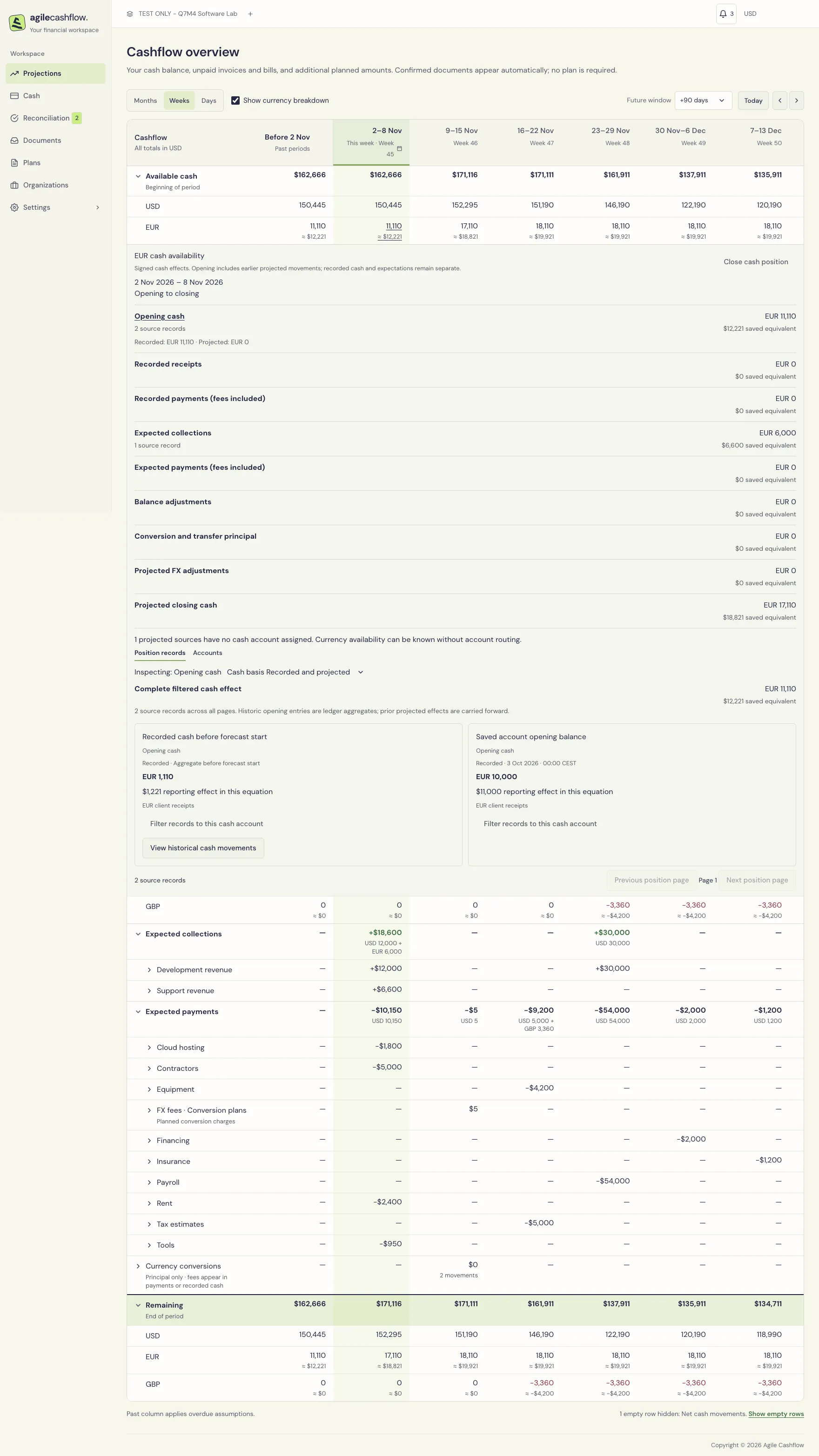
A missing quote, unclassified currency, conflicting source cash, or incomplete coverage needs investigation. Read the displayed coverage message and source details; an unavailable amount is not a confirmed zero. Saved reporting equivalents reflect recorded/reviewed conversions, rather than a live revaluation at today’s market price.
Review expected cash separately from the original
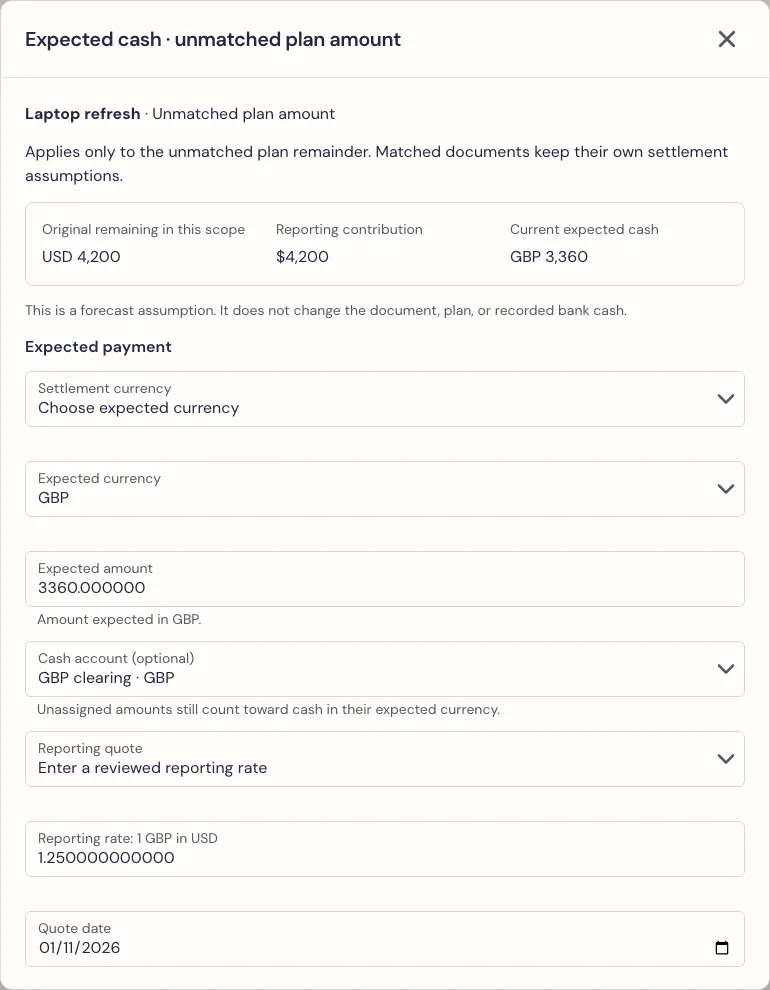
Use Review expected cash on an eligible plan amount or the expected receipt/payment action on a document contribution. The review identifies whether it applies to an unmatched plan remainder, a standalone document remainder, or a particular matched document portion. Each scope has its own instruction.
- Check Applies to, original amount, reporting value, and forecast date.
- Choose the expected/settlement currency and amount. Choose a cash account if known; its currency must agree. Leaving an account unassigned does not create a bank balance.
- Review the reporting quote or enter an explicit manual quote/date where offered.
- Preview the expected cash and before/after closing positions, then Save settlement.
- Reopen the review to inspect its history or remove the instruction when appropriate. Re-review if a source change invalidates the saved assumptions.
In the sample, the laptop plan remains USD 4,200 while expected payment is GBP 3,360 from GBP clearing. The source draft bill is still unconfirmed. This review changes expected cash terms; it does not edit the original invoice, change its legal due date, or record an actual payment. Actual payment allocation remains a separate Cash action.
The sample also contains a GBP 100 invoice paid with EUR 110. Its document saved value is USD 125, and the cash receipt saved value is USD 121. Both settlement amounts were explicitly allocated. The invoice is paid; the differing saved reporting values do not create extra cash or leave GBP 4 outstanding.
Plan a currency exchange
- Open Plans → Currency exchange → New currency exchange plan.
- Enter the date, description, currencies and both amounts: how much to send and how much to receive. Select accounts where known.
- Review the reporting quote for each foreign leg. The send/receive pair describes the exchange; a reporting quote values it in the workspace currency.
- Add expected fees separately, with their own amount, currency, account and date.
- Preview the cash-position effect, then save. Open the plan to inspect original principal, remaining principal, remaining fees, execution links and history.
Plans change expected liquidity. They do not change booked account balances. Cancel remaining plan excludes the remaining expectation while retaining recorded cash and history. Reactivate conversion plan restores eligible remaining expectations after review.
Record or link the completed exchange
| What has happened | Where to start | Effect |
|---|---|---|
| The exchange is complete and its bank movements have not been recorded | Cash → New transaction → Currency exchange → Record new exchange, or Reconciliation → Currency exchanges → Record conversion | Creates the actual debit/credit and separate fee postings. |
| Its debit and credit already exist, for example after a cash import | Cash → New transaction → Currency exchange → Link existing transactions | Classifies those existing movements together; creates no additional cash. |
| The actual exchange exists and should replace a planned exchange | Open the plan or recorded conversion and attach/reconcile it | Connects actual cash to an explicitly reviewed portion of the remaining plan. |
In New transaction, choose Currency exchange under Transaction type, then select Exchange method. Existing exchanges appear in the common transaction list: use its Currency exchanges type filter and follow a Currency exchange/Exchange fee type link to review the group.
Use eligible outgoing/incoming transactions in different currencies for linking. Review their accounts, dates, amounts, versions and fee rows. Ordinary same-currency Account transfer remains a separate cash workflow. Do not record the same exchange again after importing its bank movements.
The local exchange example
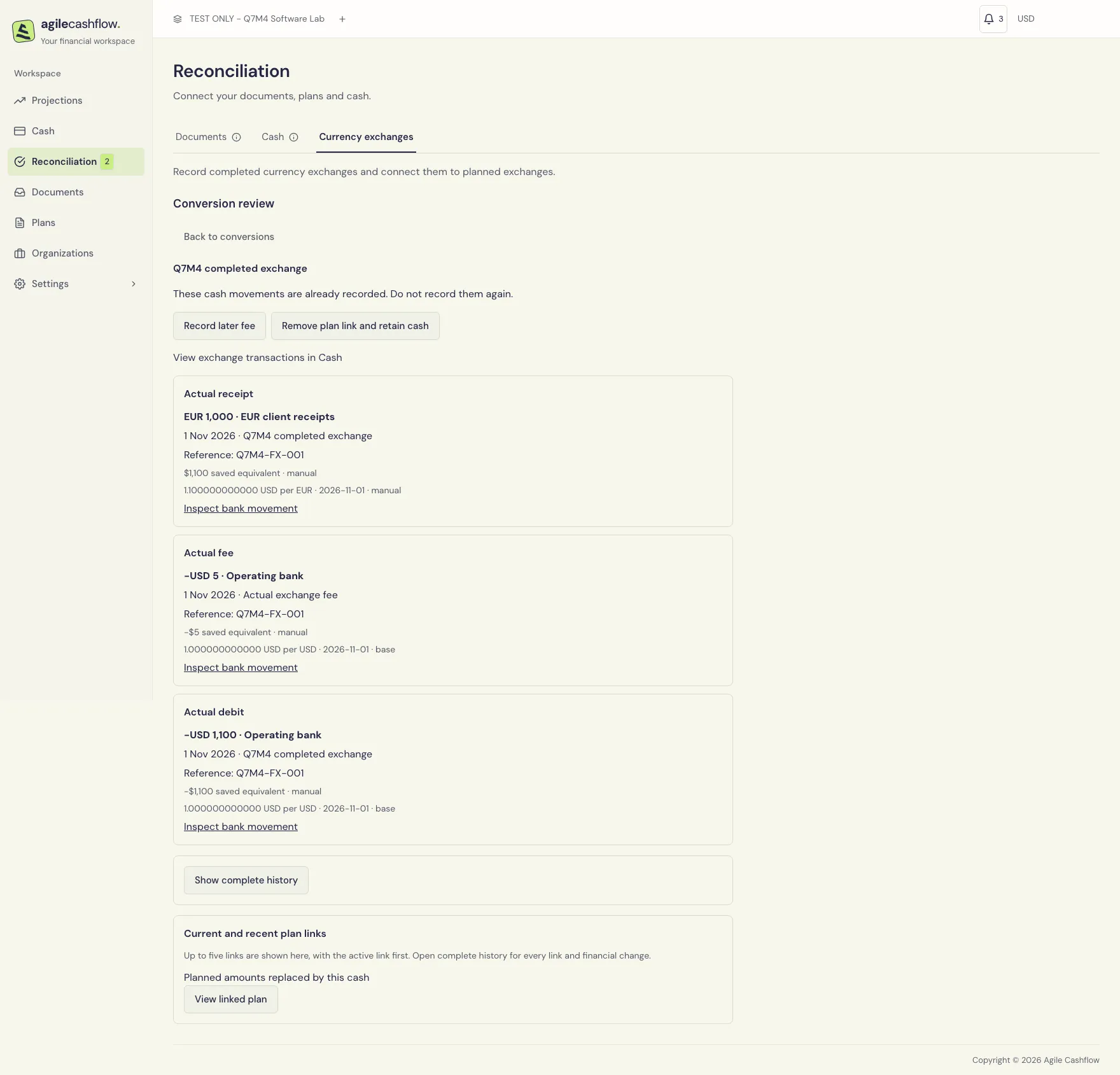
The sample starts with a plan to send USD 2,200, receive EUR 2,000, and pay a USD 10 fee. A completed exchange sends USD 1,100, receives EUR 1,000, and pays USD 5. It is linked to that plan as a partial execution:
| Item | Original plan | Recorded actual | Remaining expectation |
|---|---|---|---|
| Send | USD 2,200 | USD 1,100 | USD 1,100 |
| Receive | EUR 2,000 | EUR 1,000 | EUR 1,000 |
| Fee | USD 10 | USD 5 | USD 5 |
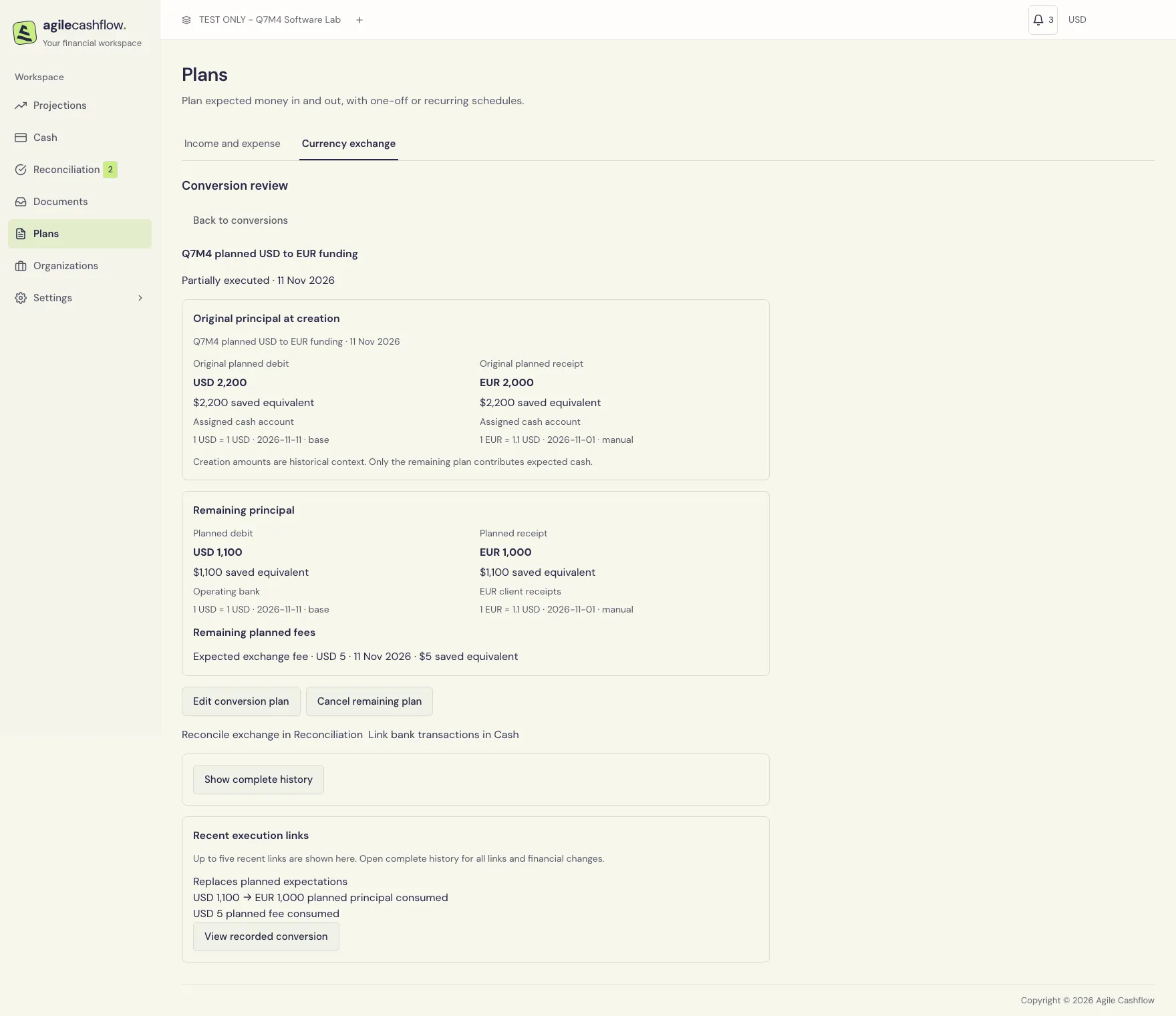
When reconciling an execution, explicitly review whether the principal is complete, partial, or left unchanged, and review each fee remainder. Actual and planned amounts can differ; the remainder is a reviewed expectation, not an assumed subtraction at today’s rate. Completed principal can leave a fee-only remainder. Review late fees using Record later fee or Link recorded fee, avoiding a duplicate charge.
Reverse the correct relationship
Open the conversion’s details and read the reversal preview before confirming. These operations have different effects:
- Remove plan link and retain cash restores consumed planned expectations and retains recorded bank cash.
- Keep cash and remove conversion classification separates the linked bank records while retaining their cash. Review any plan restoration shown in the preview.
- Void recorded conversion reverses a manually recorded conversion’s postings and allocations and restores applicable planned expectations. Review account and fee effects together; individual conversion legs are managed as a group.
Inspect retained history after any reversal. Reload and preview again when a version or forecast has changed. Viewer access can inspect permitted records; changing plans/executions requires the relevant financial permissions.
Export the review
Use Settings → Import & export → Export data. Export Projections for the selected start/interval/horizon, then the supporting Forecast settlement instructions, Forecast review history, Recorded currency conversions, Planned currency conversions, Planned conversion fees, Conversion execution links, and Cash transactions. The export reference explains the ID joins. These review datasets are export-only; they cannot be replayed as CSV imports.